


Your vendor’s post-event photo gallery sharing workflow should follow one non-negotiable sequence: collect originals → cull and edit → export and package → build branded gallery → configure access controls → host preview and sign-off → send notification → track delivery → archive masters. That is the professional standard, and it belongs in your booking contract before the event date is confirmed.
Here is what you should receive at handoff from any professional photo booth service:
- Master backup confirmation — originals retained by the vendor on a separate drive or cloud location
- Full-resolution downloads — final edited JPEG or TIFF files, not compressed web previews
- Branded gallery link — password-protected, with a configurable expiry date
- Signed delivery checklist — written confirmation that each step above was completed
- Analytics report — read receipts and download confirmations so you know who accessed what
Why not email? Standard email attachments cap at roughly 25 MB. A single photo booth session at a corporate gala can produce gigabytes of full-resolution files. Email is not a delivery method for professional event photography.
ZATTU PHOTO BOOTH builds every one of these deliverables into its standard handoff package for events across Southwestern Ontario.
Key takeaways
A professional post-event gallery sharing workflow requires master backups, a branded and password-protected gallery, verified download receipts, a signed handoff checklist, and written archive and ownership terms before the event date is confirmed.
| Point | Details |
|---|---|
| Require a signed delivery checklist | Confirm master backup, file formats, branding, access controls, and analytics in writing at handoff. |
| Email is not a delivery method | Email attachments cap at roughly 25 MB; use a dedicated photo delivery platform for full-resolution files. |
| SLAs by event type | Require 24–72 hours post-event for corporate events and 7–14 days post-event for weddings, with express options in writing. |
| Verify before the link goes out | Run a live preview check on watermarks, passwords, and sample downloads before any notification is sent. |
| ZATTU PHOTO BOOTH | Delivers branded galleries, full-resolution masters, analytics reports, and signed checklists for events across Southwestern Ontario. |
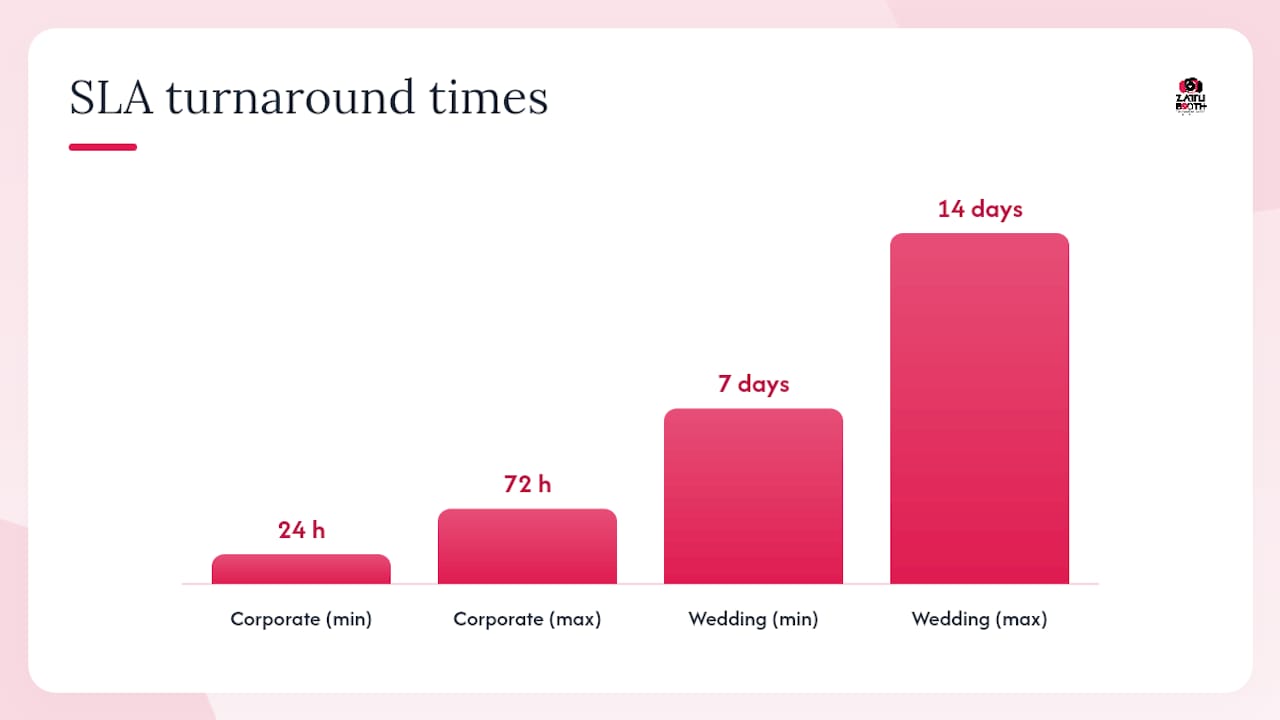
Table of Contents
- What does a professional post-event gallery workflow look like, step by step?
- Which file formats and hosting features should you require?
- What privacy and consent controls should your gallery include?
- How do you confirm delivery? A vendor handoff checklist and email template
- What turnaround times and SLAs should you require by event type?
- Who owns the photos after delivery, and how long are masters kept?
- How ZATTU PHOTO BOOTH delivers on this workflow
- The practical view from the operator
- Guaranteed branded delivery with ZATTU PHOTO BOOTH
- Sources
What does a professional post-event gallery workflow look like, step by step?
Professional gallery delivery follows a clear sequence. Each step has a host-facing checkpoint you can verify before signing off.
-
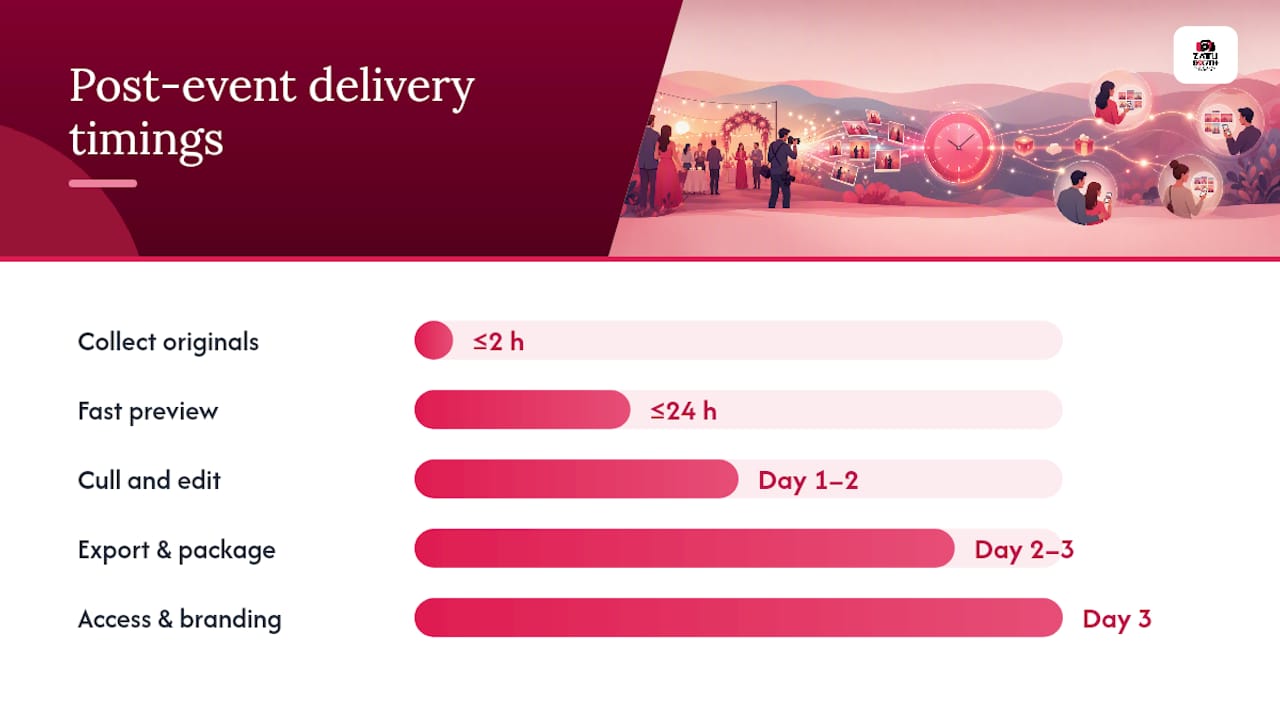
Collect and transfer originals (Day of event, within 2 hours of wrap). The vendor transfers all raw captures from the booth to a primary backup drive. You should receive written confirmation that originals are secured before the vendor leaves the venue.
-
Cull and edit (Day 1–2 post-event). The vendor reviews all captures, removes duplicates and unusable frames, and applies colour correction and retouching. Ask for a cull count: how many images were captured versus delivered.
-
Export and package files (Day 2–3). Final files are exported at full resolution. Web-optimised previews (approximately 1,200 px on the long edge) are prepared separately for gallery browsing. These are two distinct outputs with two distinct purposes.
-
Upload to hosting platform (Day 2–3). Files are uploaded to a dedicated photo delivery platform that supports branded galleries, proofing tools, and download tracking. Consumer file-sharing services are not appropriate here.
-
Configure access and branding (Day 3). The vendor applies your logo, event name, password protection, and expiry date to the gallery. Domain restrictions are added for corporate events. This step must happen before any link is sent.
-
Host preview and QA (Day 3–4). You receive a private preview link to verify branding, test sample downloads, and confirm video playback if applicable. Do not skip this step.
-
Send notification (After host approval). The gallery link goes to you and any agreed recipients only after you confirm the preview. Sending notifications before uploads or matching are complete is the most common delivery error in event photo workflows.
-
Track delivery and archive (Day 5–14, ongoing). The vendor provides read and download receipts. Masters are archived per the agreed retention period.
Many vendors run two parallel delivery paths: a fast-delivery path for quick previews (often within 24 hours) and a retouched-delivery path for fully edited finals. Require both in writing if your event needs them.
Pro Tip: Ask your vendor to confirm upload completion in writing before they send any gallery notification. A five-minute check prevents the most common guest complaint in event photo delivery.
Which file formats and hosting features should you require?
Not all delivery platforms treat your files the same way. Here is what to demand.
- Master RAW archive — retained by the vendor for the agreed period; not typically delivered to the host but available on request
- Full-resolution JPEG or TIFF — lossless or minimally compressed finals for printing and archiving; confirm the platform does not re-compress on download
- Web-optimised previews — approximately 1,200 px long edge for gallery browsing; these are not the deliverable, they are the preview
- Video: HLS streaming — if the booth captures video or GIFs, require HLS streaming for instant in-browser playback rather than forcing large-file downloads
- Resume-capable downloads — for large galleries, interrupted downloads should resume rather than restart
- Per-file download receipts — so you can confirm which files were accessed
Large multi-day events can generate thousands of photos. Even a single-evening photo booth session at a wedding or corporate gala produces files that dwarf email limits. A dedicated hosting platform is the only professional option. For guidance on how digital sharing features translate into client value, the difference between a platform and a consumer transfer service is significant.
What privacy and consent controls should your gallery include?
Privacy requirements vary by event type, but the baseline is the same for every professional delivery.
- Password protection — required for all private events; the password should be unique per event, not reused
- Configurable expiry — set a gallery expiry date (30–90 days is typical); links that never expire create unnecessary exposure
- View-only vs. download permissions — grant download access only to the host by default; expand to guests only after host approval
- Domain restrictions — for corporate events, restrict access to company email domains so only employees can log in
- Watermarking — proofing watermarks should be active on the preview gallery; unwatermarked finals are released only after host sign-off
If your vendor uses any facial-recognition or biometric matching in their workflow, explicit opt-in consent is required, along with a documented retention and deletion policy. This applies to any event where attendees did not explicitly consent to biometric processing. For corporate events specifically, access controls and consent handling are not optional extras; they are baseline professional practice.
Pro Tip: Before your vendor sends the gallery link to anyone, ask them to share a live preview with you first. Verify the watermark is active, the password works, and no raw or unbranded master files are accessible. Thirty seconds of checking prevents a serious exposure.
How do you confirm delivery? A vendor handoff checklist and email template
Use this checklist at handoff. Every item should be confirmed in writing.
- Master backup created and location documented
- Full-resolution files exported and format confirmed (JPEG/TIFF)
- Gallery branding applied (logo, event name, colours)
- Password and expiry date active
- Watermarks configured on preview; unwatermarked finals locked
- Analytics and download receipts enabled
- Host preview link sent and accepted
- Archive terms and ownership confirmed in writing
Short example delivery email your vendor should send you:
Quick QA procedure on first login:
- Download 3 sample full-resolution images and open them at 100% to verify sharpness and colour.
- Confirm watermarks appear on preview images and disappear on purchased/approved downloads.
- Play back any video or GIF files in the browser to verify HLS streaming works.
Treating delivery as a measurable service milestone with its own QA checklist is what separates professional vendors from those who simply send a link and hope for the best.
What turnaround times and SLAs should you require by event type?
Delivery timelines should be written into your contract, not assumed.
- Quick-turn preview: within 24 hours of event wrap, for events that request it (corporate, conference, school)
- Full edited gallery, weddings: 7–14 days post-event
- Full edited gallery, corporate events: 24–72 hours post-event, depending on scope and volume
- Express delivery option: 24-hour full delivery at a premium rate, available on request
Your SLA should also specify: the delivery window, exceptions (multi-day shoots, weather delays), a named escalation contact, and a remedy if the vendor misses the window (discount or re-service).
For multi-day events, daily delivery workflows keep content fresh: upload during the day, approve in the evening, publish the next morning. This prevents the large single-batch bottleneck that delays social media posting. For corporate event planning that involves tight timelines, understanding the full event workflow from setup to delivery helps hosts set realistic expectations with all vendors.
Fast delivery suits high-volume quick-access events like conferences and schools; retouched delivery suits weddings and portraits. Many professional vendors, including ZATTU PHOTO BOOTH, offer both.
Who owns the photos after delivery, and how long are masters kept?
Ownership and retention terms must be in writing before the event.
- Vendor retains masters for a defined period (one year is a common standard); originals should be stored on at least two separate media
- Checksum verification — require MD5 or SHA checksums on any master file transfer so you can confirm file integrity
- Transfer options — request either a one-time transfer to an external drive or a long-term hosted archive with documented access terms and costs
- Licence vs. ownership — confirm in writing whether you receive a full transfer of master files or a licence for use; these are legally distinct
For AI-assisted tagging and long-term archive search, the distinction between owning masters and holding a licence matters when you need to repurpose images years later for anniversary campaigns or sponsor reports.
Pro Tip: Before accepting a large master file transfer, ask the vendor to provide checksum verification and consider running a documented restore test on a sample of files. A corrupted archive discovered two years later is not recoverable.
How ZATTU PHOTO BOOTH delivers on this workflow
ZATTU PHOTO BOOTH’s post-event delivery is built around the workflow above, not bolted on as an afterthought.
- Studio-grade masters — captured on Nikon full-frame mirrorless cameras with professional lighting; equipment quality directly affects master file resolution and print viability
- Branded gallery — your logo, event name, and colours applied before any link is shared
- Password and expiry controls — active on every gallery by default
- Read and download analytics — delivered with the gallery so you can confirm access and support stakeholder reporting
- Signed delivery checklist — written confirmation of every handoff step
- Quick highlights preview — available within 24 hours for events that request it; full gallery per agreed SLA
- Owner-operator oversight — George Zattu oversees every event personally; no subcontractors
Pro Tip: ZATTU PHOTO BOOTH pre-loads your logo, consent text, and gallery template into the booth configuration before the event starts. That pre-event setup means the branded gallery is ready to publish faster after wrap, with fewer post-event edits required. It is one of the most practical ways to speed up delivery without cutting corners on quality.
The practical view from the operator
The workflow described in this article is not theoretical. Every step exists because skipping it creates a real problem: a host who cannot find their files, a gallery that exposes raw images, or a delivery that arrives three weeks after the event when the social media moment has passed.
Hosts in Southwestern Ontario who book with us get a delivery checklist they can sign off on, not just a link in their inbox. If you want a copy of our standard delivery SLA template before you book, reach out directly. We are happy to share it.
Guaranteed branded delivery with ZATTU PHOTO BOOTH
What most photo booth services skip is the part that matters most after the event: a verified, branded, trackable gallery the host can actually use. ZATTU PHOTO BOOTH delivers a complete handoff package for every event in Kitchener, Waterloo, Guelph, and Hamilton, including a branded gallery with password and expiry controls, full-resolution downloads, a signed delivery checklist, and an analytics report.
Whether you are planning a wedding, a corporate activation, or a party rental, the delivery workflow is built in. Request a quote or ask for our SLA template at Zattuphotobooth.
Sources
- Photo Delivery Service – How Pros Deliver to Clients | Fastio
- Online photo gallery | Evoto blog
- Event Photo Delivery Checklist: 12 Steps | TIME&SPACE
- Corporate Event Photo Gallery: Best Practices for 2026 | TIME&SPACE
- Event photo management guide | Tagbox
- Multi-Day Event Photo Management: Organize, Share, and Deliver at Scale | Kamero Resources
- Event planning guide for photo booth operators · Foto Master Support